

Close Menu

    Subscribe to Updates

    Get the latest creative news from FooBar about art, design and business.

    What's Hot
    Deltarune’s Man Behind the Curtain: W.D. Gaster
    July 3, 2026
    Escape From Tarkov Devs Can Finally ‘Make Real Games,’ Says CEO
    July 1, 2026
    Love and Deepspace Drama Gets Physical
    June 30, 2026
    Facebook X (Twitter) Instagram
    TheGameSlayerTheGameSlayer
    Facebook X (Twitter)
    • Home
    • News
    • Guides
    • Reviews
    • Features
    • Lists
    TheGameSlayerTheGameSlayer
    Home»Guides»How To Turn Off Trainer In FC 26
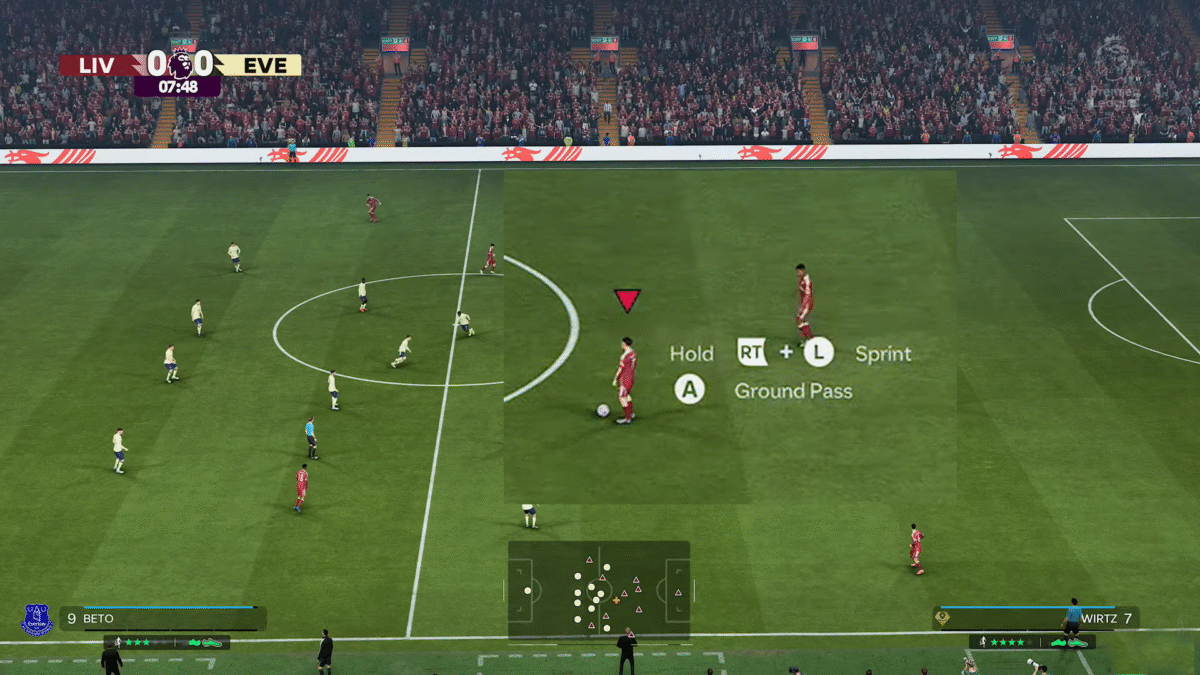
    FC 26 Trainer Message on Field
    Image via TheGameSlayer
    Guides

    How To Turn Off Trainer In FC 26

    By Santosh KumarSeptember 27, 2025Updated:September 27, 2025
    Share
    Facebook Twitter Reddit WhatsApp Pinterest LinkedIn

    If you are not into seeing tutorial messages on the screen when you are playing the game, you have the option to turn them off and even make some more changes by fiddling with the Trainer option in EA Sports FC 26. The game also opens up with a highly customizable tutorial experience by allowing you to select between the various types of game tutorials to make the game work for you. Here is how to turn off Trainer on FC 26.

    How to Turn Off Trainer on FC 26
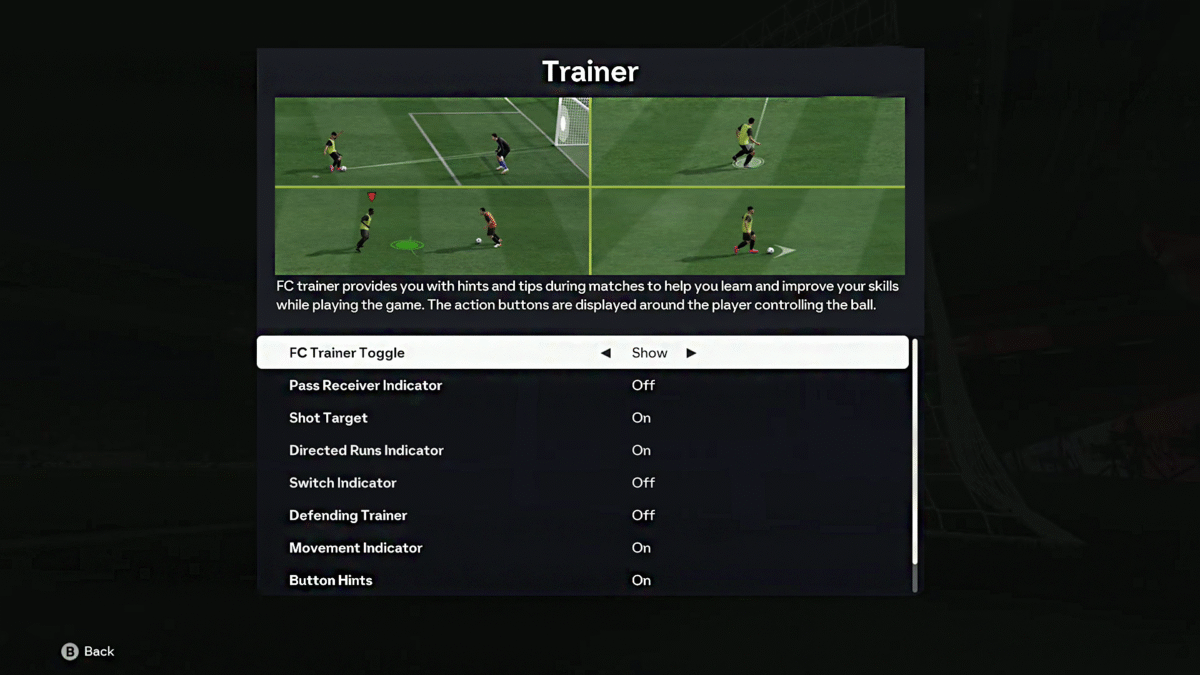
    FC 26 Trainer Options in Menu
    Image via TheGameSlayer

    You can turn off the Trainer in FC 26 by heading to the pause menu, going down the list, and turning ‘FC Trainer Toggle’ to ‘Hide’. Here you will see all the Trainer options (Tutorial features) presented in an On or Off manner. This will turn off every Trainer tip and message on the screen. If you know what you are doing in the game, then this will help make your overall gaming experience that much more immersive.

    But if you want to keep some Trainer options instead of turning off everything, then set FC Trainer Toggle to Show, and make changes to other Trainer options on the list. Here you have the option to show or hide tutorials, such as:

    • Pass Receiver Indicator
    • Shot Target
    • Direct Runs Indicator
    • Switch Indicator
    • Defending Trainer
    • Movement Indicator
    • Button Hints
    • Offside Indicator

    You can turn off or on each single individual Trainer option on the list to make the game more customizable to your liking, and a better way to handle the tutorial if you are still finding your footing in the game.

    Glitch Alert: Some players have reported a glitch after setting the option to Hide on FC Trainer Toggle. If you are facing this issue, set the FC Trainer Toggle to ‘Show’ and manually turn off every other Trainer option on the list to make it work. Some of these, though, may help you perform and time key moves like the Low Passing Shot in FC 26 better, so consider this once before toggling it off.

    That’s it, now you can play the game without any Trainer message or dealing with only a few in FC 26.

    FC 26
    Santosh Kumar
    • LinkedIn

    Santosh Panda creates gaming guides at The Game Slayer. With 5 years of writing experience under his belt, his journey to game writing has helped many fight the big monsters, solve intricate puzzles, disarm the hidden traps, and finally open the treasure box.

    Related Posts

    Deltarune Chapter 5 – How to Easily Defeat Flowery

    June 27, 2026

    Deltarune Chapter 5 – How to Beat Yellow & Blue

    June 26, 2026

    Deltarune Chapter 5 – Weird Route Guide

    June 26, 2026
    PREFERED SOURCE ON GOOGLE

    Add as your Preferred Source on Google to find us more easily next time in your searches!

    FOLLOW US
    • Facebook
    • Twitter
    • Bluesky
    • Mastodon
    Don't Miss
    Features
    Deltarune’s Man Behind the Curtain: W.D. Gaster
    July 3, 2026

    W.D. Gaster is a name that feels far too relevant to ignore anymore. Let’s go over his significance to Deltarune!

    Escape From Tarkov Devs Can Finally ‘Make Real Games,’ Says CEO

    July 1, 2026

    Love and Deepspace Drama Gets Physical

    June 30, 2026

    Resident Evil Would Be a Great Cozy Game, According to Director

    June 30, 2026

    GTA 6 Is Too Much Even For The PS5 Pro

    June 30, 2026

    GTA 6 Reportedly Will Never Get a Disc

    June 27, 2026

    Deltarune Chapter 5 – What Happened to Onionsan?

    June 27, 2026
    • Home
    • Privacy Policy
    • About Us
    • Contact Us
    • Reviews Policy
    • OPENCRITIC
    © 2026 TheGameSlayer

    Type above and press Enter to search. Press Esc to cancel.

    We use cookies to ensure that we give you the best experience on our website. If you continue to use this site we will assume that you are happy with it.