

Close Menu

    Subscribe to Updates

    Get the latest creative news from FooBar about art, design and business.

    What's Hot
    REPLACED – How to Solve the Flower Tent Code
    April 17, 2026
    Lana Del Rey Becomes the Latest 007 Theme Song Performer
    April 17, 2026
    Mouse: P.I. For Hire – How to Win at Baseball Cards
    April 16, 2026
    Facebook X (Twitter) Instagram
    TheGameSlayerTheGameSlayer
    Facebook X (Twitter)
    • Home
    • News
    • Guides
    • Reviews
    • Features
    • Lists
    TheGameSlayerTheGameSlayer
    Home»Guides»How to Play Against Bots in Battlefield 6
    Official Battlefield image of soldiers going through a desert for war
    EA
    Guides

    How to Play Against Bots in Battlefield 6

    By Sampad BanerjeeOctober 11, 2025
    Share
    Facebook Twitter Reddit WhatsApp Pinterest LinkedIn

    Playing against bots in Battlefield is not a new thing, and Battlefield 6 players might want to try it out. After all, it allows you to try things out at your leisure, without worrying about any other players out there. So if you want to take a breather from your single-player journey, taking out some AAA turrets, you can spend some time killing bots until you jump into the actual multiplayer.

    You can set up a bot-only lobby in-game to experience and enjoy this. However, it requires a lot of work on your part, which isn’t available in the Battlefield 6 main menu.

    Playing Against Bots In Battlefield 6

    The only real way to play against bots in Battlefield 6 is through a custom-made Portal server. Portal is an additional content in Battlefield 6 that allows players to create their own content. So, to play against bots, you’ll have to follow these steps:

    • First, visit the official Battlefield 6 Portal website. Click here to go there directly. Then, log in with the EA account associated with your Battlefield 6 game. It can be the one linked to your Steam copy or the console copy. Use that exact one.
    • Right after you sign in, you get greeted with the main Portal page with the option to create new maps and start editing existing ones. Click on the create new option.
    Select make a new map on BF6 Portal
    EA
    • On the next page, click on the verified mode, choose one of your preferred game modes, and click on the start editing option. You can choose between Breakthrough, Conquest, and Rush.
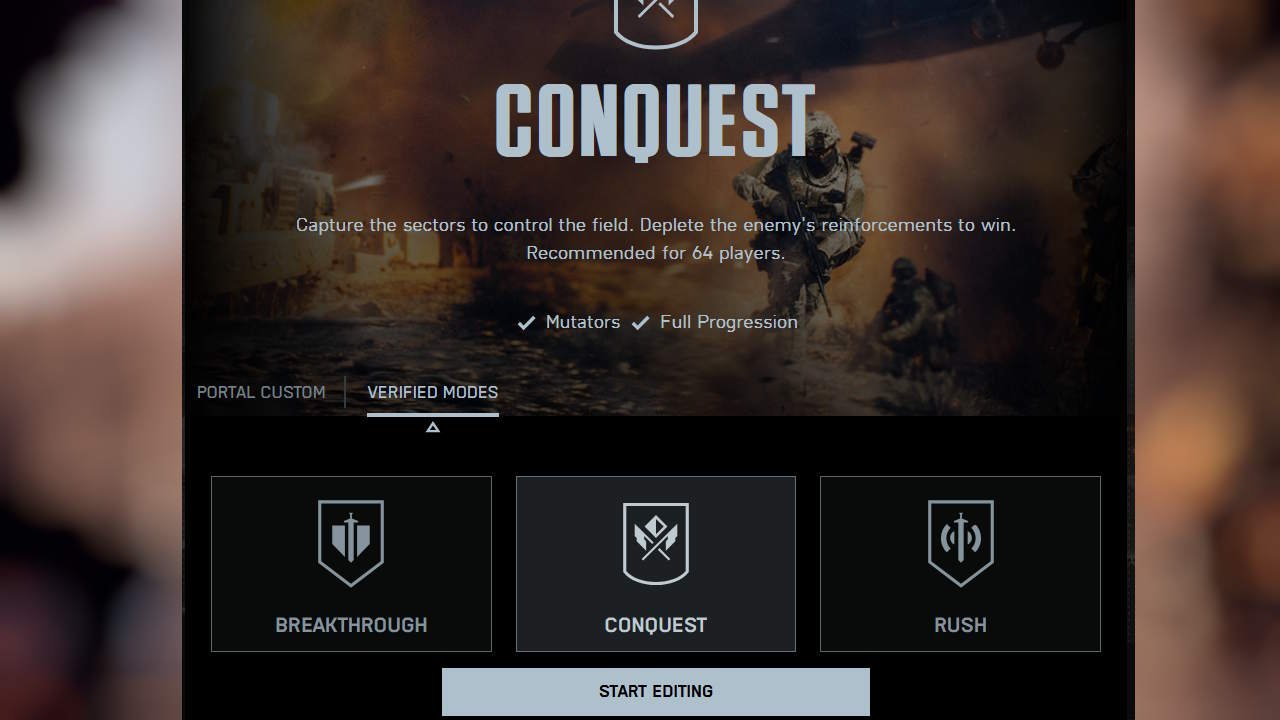
    Select game mode from verified modes in Battlefield 6
    EA
    • Inside the mode section, select the map rotation section, and choose the map you want to play on with bots.
    Choose a Battlefield 6 map from the map rotation screen
    EA
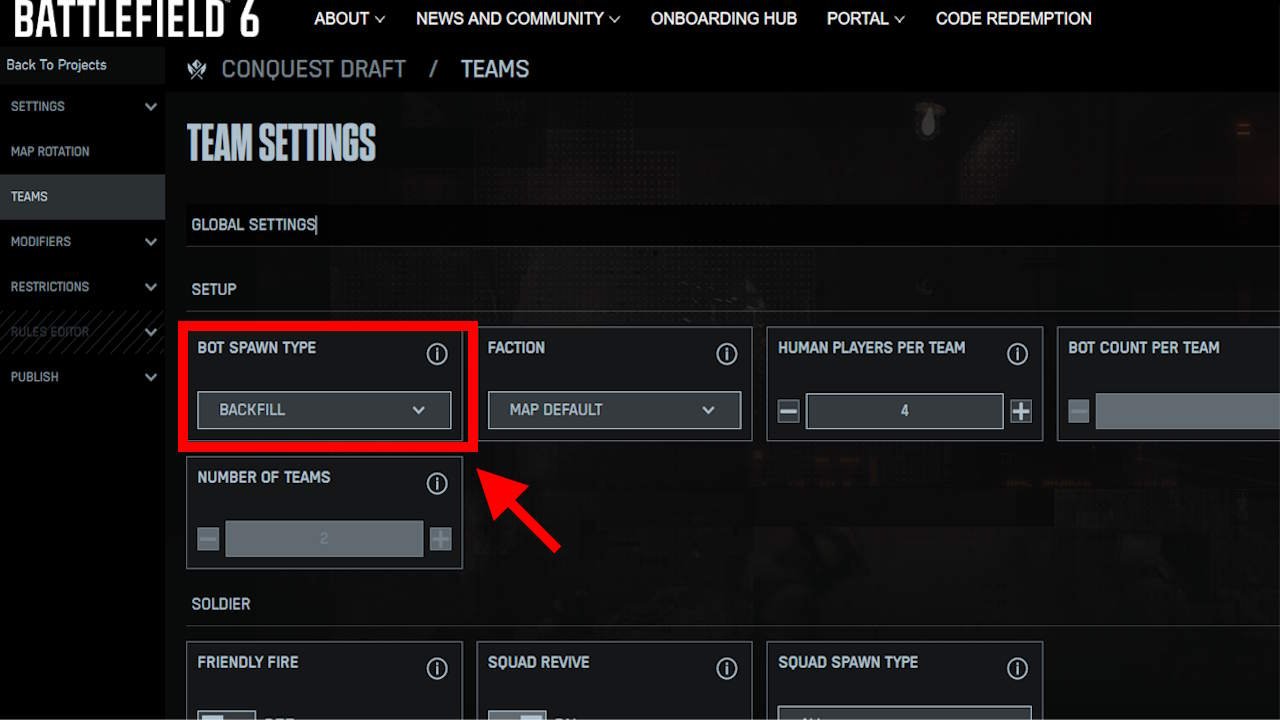
    • Then, under teams, go to the Bot Spawn Type dropdown menu and select the option to Backfill. Then choose how many human players you want. If you want it only for you, make it one.
    • After you’ve done this, select publish, name your server, and add a description. Then choose an icon under step 2. Once you are done, go to step 3, save your changes, and hit the Submit to publish button.
    • Now, go to the main menu of Battlefield 6, and select the Community option. Choose the “My Experience” option to locate the server you made with Portal, and click on it.

    Now, you’ll be able to play with bots in-game without any problem and enjoy the game. You can also invite your friends to the lobby and play together with the bots if you’ve assigned the appropriate number of players allowed in the server. This is the only current way of playing with bots in Battlefield 6 currently.

    Battlefield 6
    Sampad Banerjee
    • X (Twitter)
    • Instagram

    Sampad is the resident RPG, action-adventure, and fighting game nerd. With three years of writing experience over multiple gaming websites, Sampad loves playing through old sixth and seventh generation games. On other days, he's probably day-dreaming and making his cosplay projects.

    Related Posts

    REPLACED – How to Solve the Flower Tent Code

    April 17, 2026

    Mouse: P.I. For Hire – How to Win at Baseball Cards

    April 16, 2026

    REPLACED – How to get the password for the Slave Cages Puzzle

    April 16, 2026
    PREFERED SOURCE ON GOOGLE

    Add as your Preferred Source on Google to find us more easily next time in your searches!

    FOLLOW US
    • Facebook
    • Twitter
    • Bluesky
    • Mastodon
    Don't Miss
    Guides
    REPLACED – How to Solve the Flower Tent Code
    April 17, 2026

    One of the highlights of REPLACED is coming back to the railway station after a…

    Lana Del Rey Becomes the Latest 007 Theme Song Performer

    April 17, 2026

    Mouse: P.I. For Hire – How to Win at Baseball Cards

    April 16, 2026

    REPLACED – How to get the password for the Slave Cages Puzzle

    April 16, 2026

    Windrose – How to Craft a Shovel

    April 16, 2026

    Windrose – How to Get Charcoal, Ash, & Coarse Fabric

    April 16, 2026
    8.0

    Mouse: P.I. For Hire Review

    April 14, 2026
    • Home
    • Privacy Policy
    • About Us
    • Contact Us
    • Reviews Policy
    • OPENCRITIC
    © 2026 TheGameSlayer

    Type above and press Enter to search. Press Esc to cancel.

    We use cookies to ensure that we give you the best experience on our website. If you continue to use this site we will assume that you are happy with it.