

Close Menu

    Subscribe to Updates

    Get the latest creative news from FooBar about art, design and business.

    What's Hot
    How to Complete the Playground (Child’s Play) in Low-Budget Repairs
    August 15, 2026
    How to Throw and Drop Items in Low-Budget Repairs
    August 15, 2026
    Limbus Company News – Cinq East Hong Lu Trailer, Callisto and Albina Announcer, Lei Heng Reflectrial
    August 14, 2026
    Facebook X (Twitter) Instagram
    TheGameSlayerTheGameSlayer
    Facebook X (Twitter) Instagram YouTube
    • Home
    • News
    • Guides
    • Reviews
    • Features
    • Lists
    TheGameSlayerTheGameSlayer
    Home»Guides»Shadowverse: How To Link Account To Worlds Beyond
    Shadowverse Worlds Beyond Home Screen (1)
    Image via TheGameSlayer
    Guides

    Shadowverse: How To Link Account To Worlds Beyond

    By Santosh KumarJune 17, 2025
    Share
    Facebook Twitter Reddit WhatsApp Pinterest LinkedIn

    If you already have an account on Shadowverse, you can link it to the new Shadowverse: Worlds Beyond to receive a long list of unique rewards. The process of linking the accounts is easier, as the game shows you the option to link the account right on the home page. Here is a complete guide to share your Shadowverse link with the Shadowverse: Worlds Beyond.

    Linking Shadowvere Account with Worlds Beyond
    Shadowverse Worlds Beyond Home Screen (1)
    Image via TheGameSlayer

    Make sure to have both the original Shadowverse and Worlds Beyond installed. We need to open both of them at the same time to carry out the linking process.

    • Download Shadowverse: Worlds Beyond, create your user name, and finish the prologue until you reach the home screen. Once you are in the World Beyond home screen, open the original Shadowverse on the side.
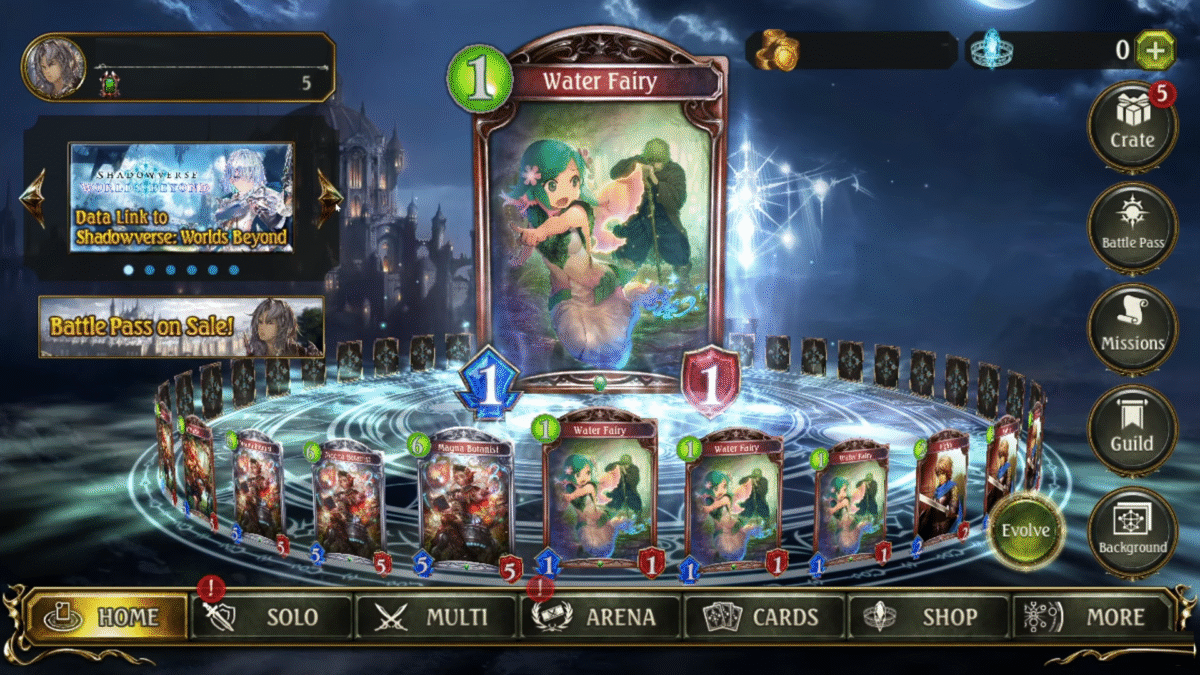
    • Head to the home screen of the original Shadowverse, look at the top-left side of the screen, and you will notice various Shadowverse-related pages. Here, keep hitting the arrow key until you see the page that says: Data Link to Shadowverse: Worlds Beyond. Click on the link and you will receive an agreement on your screen, just check “I agree to the above“, and choose Link to generate a link password.

    Note: The password is only valid for 8 hours, then you must generate it again to make the link. So remember the password as you will need it to link between Shadowverse and the Worlds Beyond.

    • Now switch over to Shadowverse: Worlds Beyond. Here at the bottom left of the screen, you will see a selection page similar to the original Shadowverse. Click on the arrow until you see the page that says Link with Shadowverse.
    • Clicking the link will get you to a new page, where you must input your “Shadowverse User ID “and “One-Time Password“. Now, under the Shadowverse User ID, add your original Shadowverse user ID information, but under One-Time Password, add the password you generated in the Data Link to Shadowverse: Worlds Beyond section. Then press Ok at the bottom to proceed.

    After a few seconds, you will receive a confirmation prompt saying “You have successfully linked your Shadowverse account and may now view your Shadowverse battle records,” followed by “Data link bonuses will be sent to your crate.”

    You can see all the rewards by clicking on the Crate icon on the right panel. That’s it, now both Shadowverse and Shadowverse: Worlds Beyond are linked together.

    Shadowverse
    Santosh Kumar
    • LinkedIn

    Santosh Panda creates gaming guides at The Game Slayer. With 5 years of writing experience under his belt, his journey to game writing has helped many fight the big monsters, solve intricate puzzles, disarm the hidden traps, and finally open the treasure box.

    Related Posts

    How to Complete the Playground (Child’s Play) in Low-Budget Repairs

    August 15, 2026

    How to Throw and Drop Items in Low-Budget Repairs

    August 15, 2026

    Marvel Tokon: Fighting Souls – How to Play Spider-Man and His Best Teams

    August 13, 2026
    PREFERED SOURCE ON GOOGLE

    Add as your Preferred Source on Google to find us more easily next time in your searches!

    FOLLOW US
    • Facebook
    • Twitter
    • Instagram
    • YouTube
    Don't Miss
    Guides
    How to Complete the Playground (Child’s Play) in Low-Budget Repairs
    August 15, 2026

    Stuck on the Child’s Play mission? Here’s how to complete the playground properly.

    How to Throw and Drop Items in Low-Budget Repairs

    August 15, 2026

    Limbus Company News – Cinq East Hong Lu Trailer, Callisto and Albina Announcer, Lei Heng Reflectrial

    August 14, 2026
    8.5

    Duskfade Review: A Mascot Platformer Rolling Back The Clock

    August 13, 2026
    6.5

    Low-Budget Repairs Review: House Flipper For Landlords

    August 13, 2026

    Marvel Tokon: Fighting Souls – How to Play Spider-Man and His Best Teams

    August 13, 2026

    Beast of Reincarnation – All Character Roles Explained

    August 12, 2026
    • Home
    • Privacy Policy
    • About Us
    • Contact Us
    • Reviews Policy
    • OPENCRITIC
    © 2026 TheGameSlayer

    Type above and press Enter to search. Press Esc to cancel.

    We use cookies to ensure that we give you the best experience on our website. If you continue to use this site we will assume that you are happy with it.