Close Menu

    Subscribe to Updates

    Get the latest creative news from FooBar about art, design and business.

    What's Hot
    Slay the Spire 2 – How To Easily Defeat the Aeonglass Boss
    May 9, 2026
    10 Best Low Stress RTS Games
    May 7, 2026
    Far Far West – All 3 Mysterious Train Wreck Locations
    May 4, 2026
    Facebook X (Twitter) Instagram
    TheGameSlayerTheGameSlayer
    Facebook X (Twitter)
    • Home
    • News
    • Guides
    • Reviews
    • Features
    • Lists
    TheGameSlayerTheGameSlayer
    Home»Guides»How To Use The Template Hammer In ARK: Survival Ascended
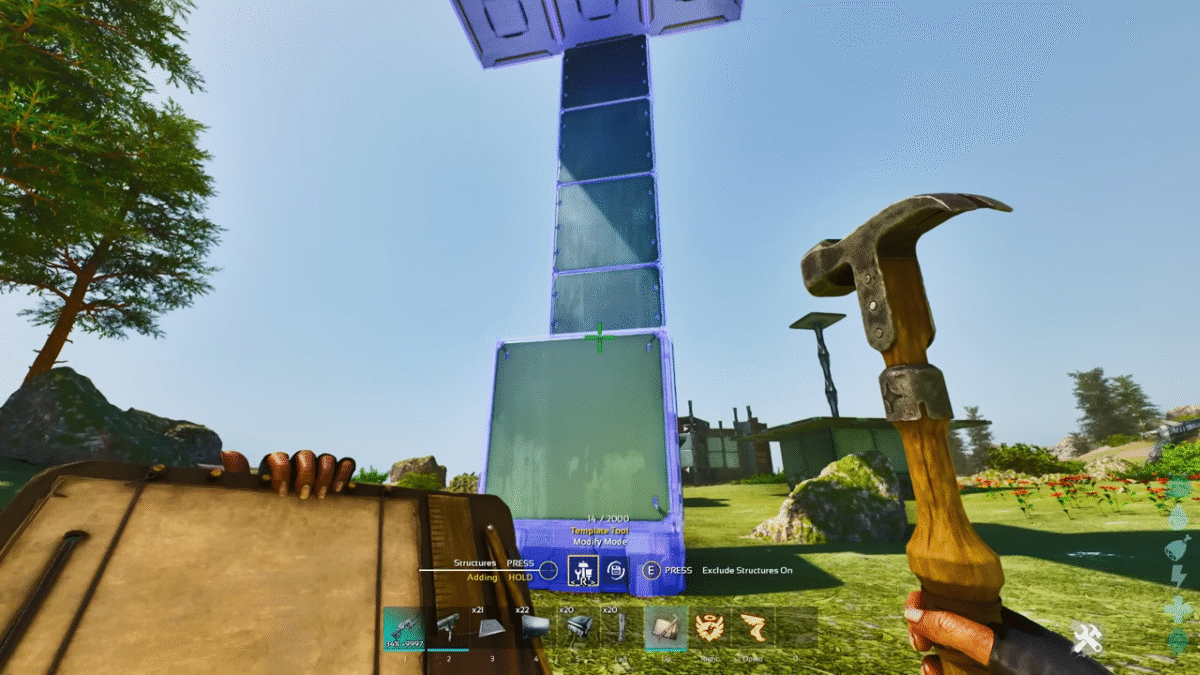
    template hammer ark feature image
    Image via TheGameSlayer
    Guides

    How To Use The Template Hammer In ARK: Survival Ascended

    By Aniruddh KaJune 24, 2025
    Share
    Facebook Twitter Reddit WhatsApp Pinterest LinkedIn

    The Template Hammer in Ark Survival Ascended is a handy tool that lets players copy, save and alter entire buildings and structures with ease. Whether you’re trying to replicate a complex base design or streamline your building process, this hammer helps you do the heavy lifting with different options like saving templates and auto-build mode. This guide will show you how to craft the hammer and use it to maximise your efficiency for future builds in ARK: Survival Ascended

    Crafting A Template Hammer
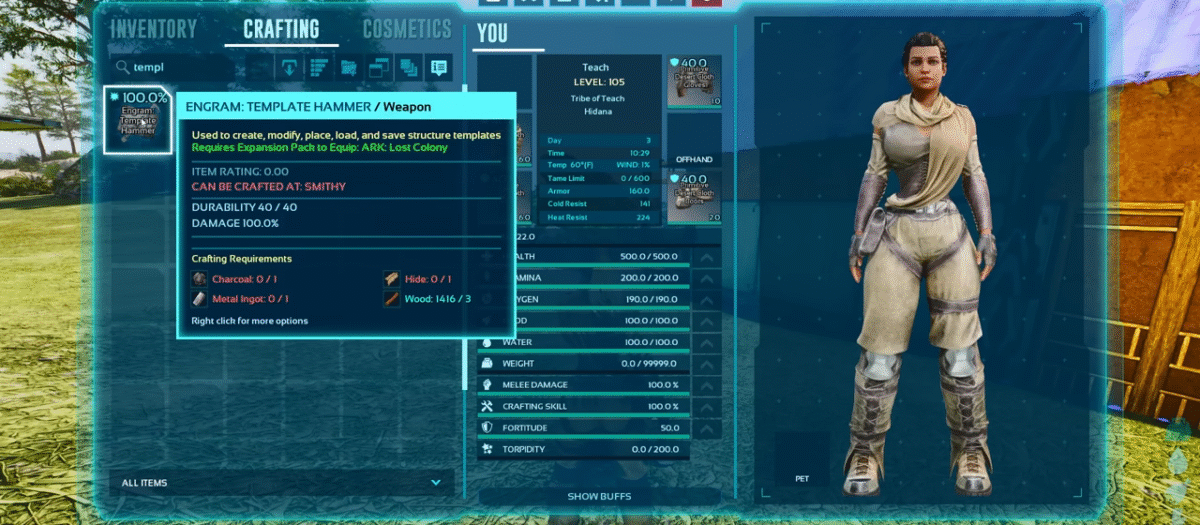
    template hammer ark crafting requirements
    Image via TheGameSlayer

    Open up your inventory and go to the ‘Crafting’ section and search for the template hammer. Once you hover on the hammer, you’ll notice that you need:

    • 1 Charcoal
    • 1 Metal Ingot
    • 1 Hide
    • 3 Wood

    After you’ve crafted the hammer, drag it on to one of your hotbar slots and you’re good to go!

    How To Use The Template Hammer

    template hammer ark modes
    Image via TheGameSlayer

    After you’ve equipped the hammer, holding it’ll allow you to cycle through multiple modes. The mode you’re in will be shown just above the hotbar. Press ‘R’ to switch between these 3 modes:

    Create Mode: The create mode will allow you to copy any structure you’ve placed, as well as its connected structures. You can either ‘Select single’ or ‘Select all’. As these names suggest, the former option is for selecting specific pieces of the structure, whereas the latter is for selecting the entire structure. After you’ve copied a structure, you can use the Template Mode to place the copied structure.

    Template Mode: Select the middle option to enter Template Mode. This mode allows you to place pre-planned buildings if you’re not confident in your craftsmanship. Once you’ve selected a template, you can move it around, rotate it, change the height, etc. After you’re confident in where you want to place it, press the ‘Left mouse Button’ to put it down.

    Build Mode: The third option is the Build Mode. Once the template is placed, the build mode handles the rest of it. This mode has 3 other sub-modes, consisting of Auto Build, Alter Mode and Complete Mode.

    • Auto Build: If you have the Auto Build mode available, it’ll start building the structure you’ve placed by using the resources in your inventory.
    • Alter Mode: Allows you to modify the structure you’ve placed down, like removing certain sections of the template.
    • Complete Mode: This mode is basically just confirming that you’re done building and you’re not going to make any changes yet. You can also apply skins in this mode.
    ARK: Survival Ascended
    Aniruddh Ka

    I enjoy gaming and coding. Spent most of my time on online competitive games trying to rank up, while trying to break through in the gaming industry one article at a time.

    Related Posts

    Slay the Spire 2 – How To Easily Defeat the Aeonglass Boss

    May 9, 2026

    Far Far West – All 3 Mysterious Train Wreck Locations

    May 4, 2026

    Gambonanza – Best Early Game Gambits

    May 3, 2026
    PREFERED SOURCE ON GOOGLE

    Add as your Preferred Source on Google to find us more easily next time in your searches!

    FOLLOW US
    • Facebook
    • Twitter
    • Bluesky
    • Mastodon
    Don't Miss
    Guides
    Slay the Spire 2 – How To Easily Defeat the Aeonglass Boss
    May 9, 2026

    A new update has hit Slay the Spire 2’s beta branch, packed with balance changes,…

    10 Best Low Stress RTS Games

    May 7, 2026

    Far Far West – All 3 Mysterious Train Wreck Locations

    May 4, 2026

    Gambonanza – Best Early Game Gambits

    May 3, 2026

    Neverness to Everness – Pink Paws Heist Guide (Map layouts, Tips & More)

    May 3, 2026

    Far Far West – The Complete Willy Billy Questline

    May 2, 2026

    Neverness to Everness: Miles Apart Quest Guide

    May 1, 2026
    • Home
    • Privacy Policy
    • About Us
    • Contact Us
    • Reviews Policy
    • OPENCRITIC
    © 2026 TheGameSlayer

    Type above and press Enter to search. Press Esc to cancel.

    We use cookies to ensure that we give you the best experience on our website. If you continue to use this site we will assume that you are happy with it.