Close Menu

    Subscribe to Updates

    Get the latest creative news from FooBar about art, design and business.

    What's Hot
    Windrose – How to Get the Conquistador’s Armor
    April 23, 2026
    Windrose – How to Remove a Death Marker
    April 23, 2026
    7.0
    REPLACED Review
    April 23, 2026
    Facebook X (Twitter) Instagram
    TheGameSlayerTheGameSlayer
    Facebook X (Twitter)
    • Home
    • News
    • Guides
    • Reviews
    • Features
    • Lists
    TheGameSlayerTheGameSlayer
    Home»Guides»How To Get Expert Manual Pages in Dying Light: The Beast
    Guides

    How To Get Expert Manual Pages in Dying Light: The Beast

    By Kirthana KSeptember 25, 2025
    Share
    Facebook Twitter Reddit WhatsApp Pinterest LinkedIn

    ​While upgrading your blueprints in Dying Light: The Beast, you would have noticed that each upgrade requires a certain number of manual pages of varying types. The hardest of the pages to collect are the Expert Manual Pages, which require extensive exploration to locate them all. Keep reading below to know how to easily farm Expert Manual Pages in Dying Light: The Beast.

    ​Expert Manual Pages Farming Guide Dying Light: The Beast
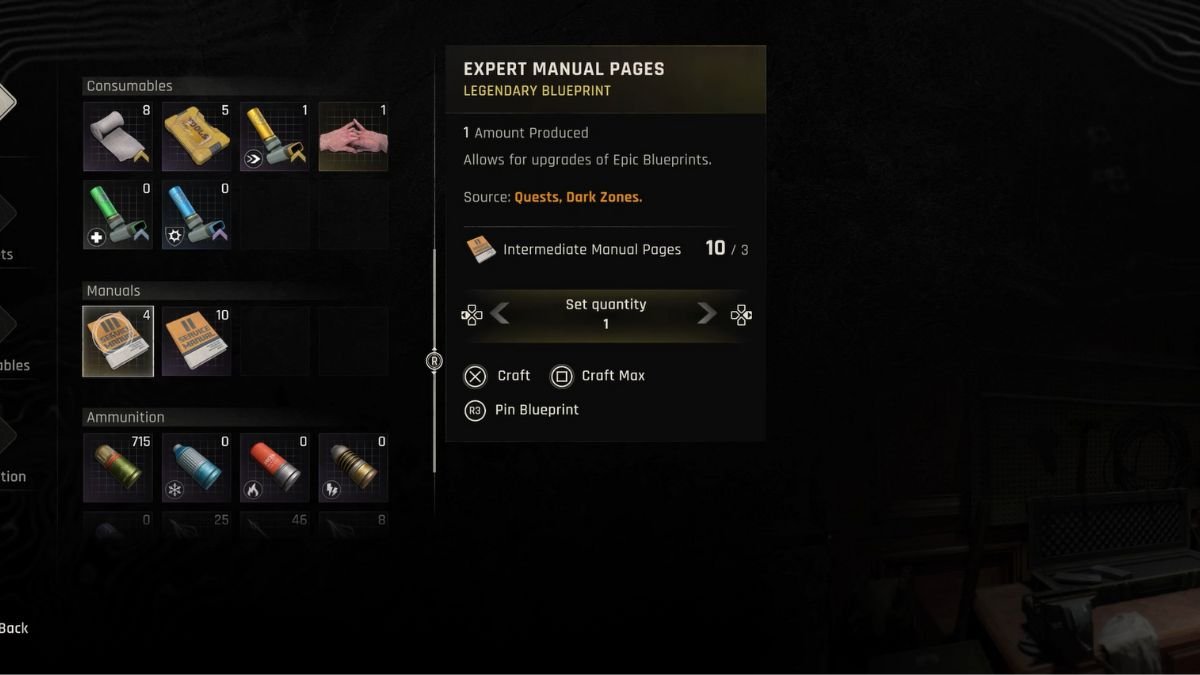
    Image via TheGameSlayer

    ​Expert Manual Pages are a late-game item that’s usually found within Dark Zones or by completing side quests. Once you reach level 12 and beyond, you will have a higher chance of finding them through the newly unlocked, late-game side quests. As for Dark Zones, try exploring the ones in level 11 areas and beyond. While interacting with the Dark Zone icon, you can see the rewards you get. Try to find zones that offer Expert Manual Pages in the reward pool.

    ​Another way to get Expert Manual Pages is through crafting. First, collect at least one Expert Manual Page in the world, as this unlocks the crafting blueprint. Next, go to any crafting workbench or open your inventory and locate the Expert Manual Page blueprint. Scroll down to the Manuals section to find it, then select the crafting option. To craft one Expert Manual Page, you need three Intermediate Manual Pages. Select the blueprint and craft the page from your available materials.

    ​How to Use Expert Manual Pages

    Image via TheGameSlayer

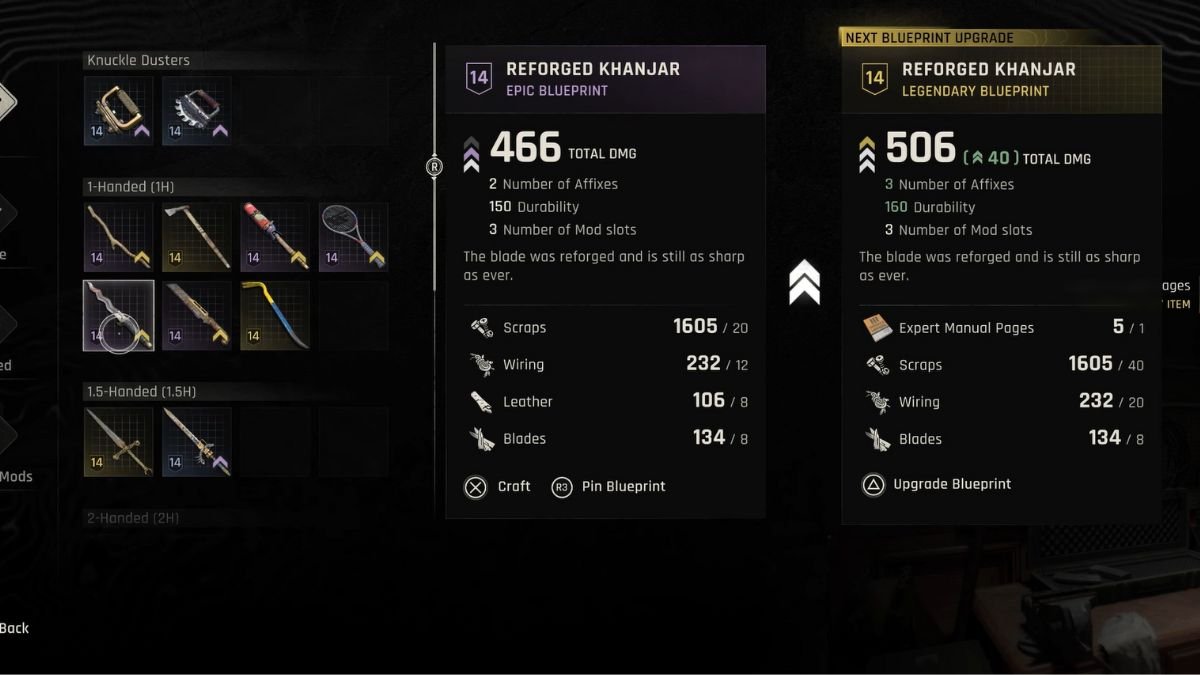
    ​Use Expert Manual Pages to upgrade weapon and gear blueprints to legendary status, boosting their stats and damage. To apply a page, select gear or weapons at the Epic tier and use an Expert Manual Page to elevate them to the Legendary Tier. ​Since this is a late-game feature, you still have a long way to go before reaching this point. Also, keep all Beginner or Intermediate Manual Pages, as they’re needed to craft higher-tier pages.

    You could try finding Expert Manual Pages within the safes and secret bunkers of Dying Light: The Beast, but you would definitely find them while exploring the overworld.

    Dying Light: The Beast
    Kirthana K
    • LinkedIn

    Her lifelong passion of gaming led her to writing about them, bringing words to life and compiling comprehensive game guides that are quick and easy to follow. If not writing, you can catch her exploring Teyvat or the Palpagos Islands.

    Related Posts

    Windrose – How to Get the Conquistador’s Armor

    April 23, 2026

    Windrose – How to Remove a Death Marker

    April 23, 2026

    Pragmata – The Complete Training Sim Guide

    April 20, 2026
    PREFERED SOURCE ON GOOGLE

    Add as your Preferred Source on Google to find us more easily next time in your searches!

    FOLLOW US
    • Facebook
    • Twitter
    • Bluesky
    • Mastodon
    Don't Miss
    Guides
    Windrose – How to Get the Conquistador’s Armor
    April 23, 2026

    If you want to go for a tanky build in Windrose, then you’ll want to…

    Windrose – How to Remove a Death Marker

    April 23, 2026
    7.0

    REPLACED Review

    April 23, 2026
    7

    Tides of Tomorrow Review

    April 21, 2026

    Pragmata – The Complete Training Sim Guide

    April 20, 2026

    PRAGMATA – Large Bot Boss Fight Guide

    April 19, 2026

    The Top 3 Pragmata Builds

    April 19, 2026
    • Home
    • Privacy Policy
    • About Us
    • Contact Us
    • Reviews Policy
    • OPENCRITIC
    © 2026 TheGameSlayer

    Type above and press Enter to search. Press Esc to cancel.

    We use cookies to ensure that we give you the best experience on our website. If you continue to use this site we will assume that you are happy with it.