

Close Menu

    Subscribe to Updates

    Get the latest creative news from FooBar about art, design and business.

    What's Hot
    Far Far West – All 3 Mysterious Train Wreck Locations
    May 4, 2026
    Gambonanza – Best Early Game Gambits
    May 3, 2026
    Neverness to Everness – Pink Paws Heist Guide (Map layouts, Tips & More)
    May 3, 2026
    Facebook X (Twitter) Instagram
    TheGameSlayerTheGameSlayer
    Facebook X (Twitter)
    • Home
    • News
    • Guides
    • Reviews
    • Features
    • Lists
    TheGameSlayerTheGameSlayer
    Home»Guides»How to Change Region Server in Delta Force (PC, Mobile, Console)
    Guides

    How to Change Region Server in Delta Force (PC, Mobile, Console)

    By Kirthana KSeptember 19, 2025
    Share
    Facebook Twitter Reddit WhatsApp Pinterest LinkedIn

    ​The latest feature to be introduced in Delta Force is the option to change server regions. This allows players to hop into a different server if the one they are on is overcrowded or dead. Having a more pleasant gaming experience is important, hence why server hopping is the norm. This guide will detail how to change servers in Delta Force.

    ​Delta Force – How to Change Server for PC, Console, and Mobile
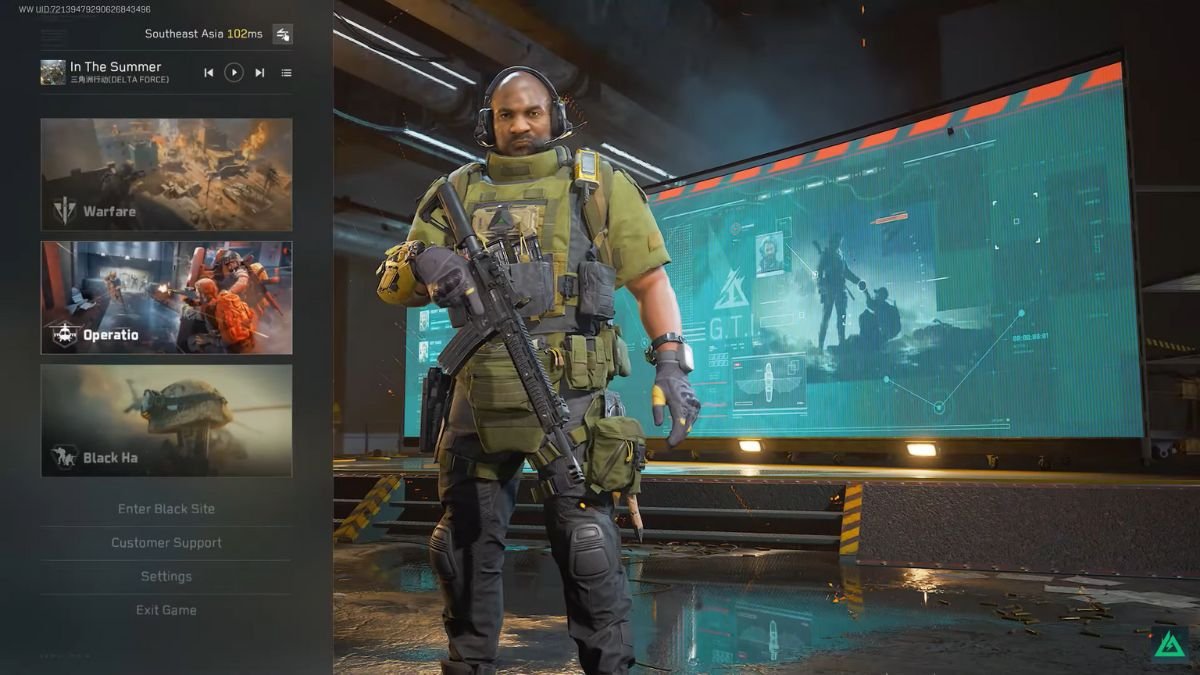
    Image via @DeltaForceUpdates

    ​You can now change your server region through the Switch Server Node option. To find this option, head into the game’s home screen and select the Switch Mode option at the bottom left corner of the screen. Within the sub-menu, at the top, you will find your current server region and ping. Click on the arrow icon right beside this to be taken to the Switch Server Node menu.
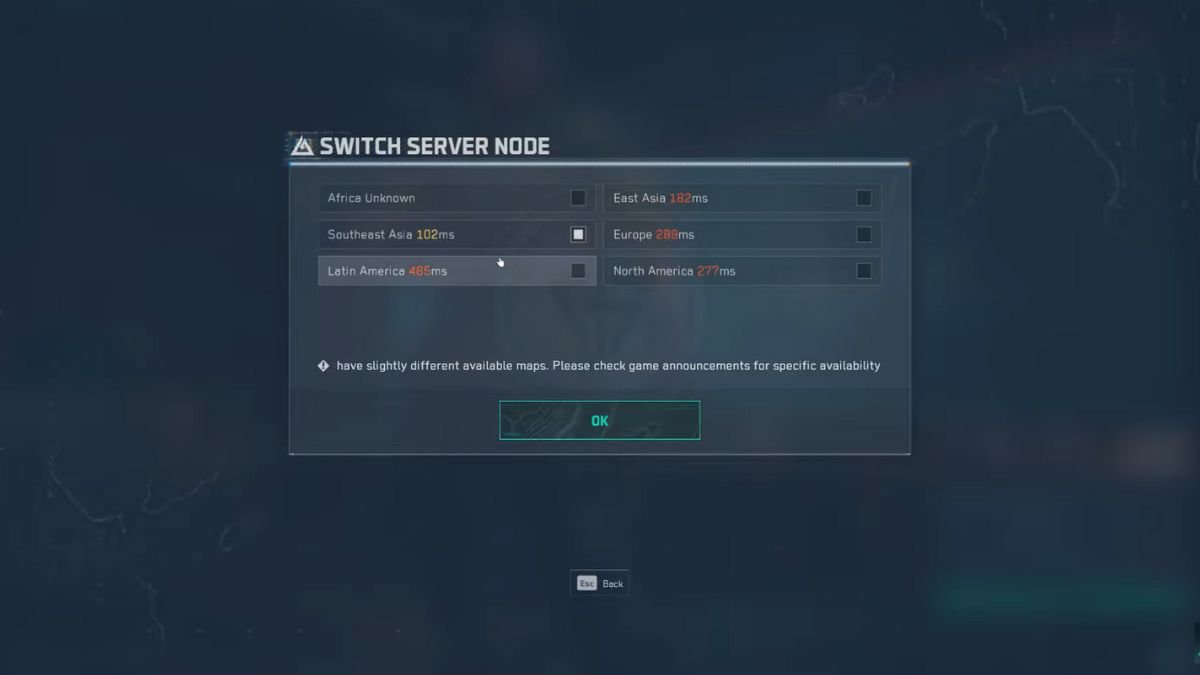
    Image via @DeltaForceUpdates

    ​Over here, you get a list of all available regions you could switch to, as well as the ping rate for each. The further away from your home region you get, the higher the ping. It is best to find a region with the lowest ping possible to avoid gameplay issues. Click on OK once you are done to set your game to the new region. There won’t be a region lock anymore, and you get to change servers across all game modes.

    ​This feature is currently available in the Season 6 test servers. Once Season 6 gets its full launch on 23rd September, all players will get this option from the get-go.

    Other Ways to Change Servers in Delta Force

    If you can’t wait for this option to appear, then there are two other ways to change servers for now: either via VPN, or by downloading the regional version of Delta Force. Most VPNs work with the game, and you just need to go through the app’s settings to find the game and add it to a separate region. Downloading Delta Force’s regional app requires you to start from scratch, which might not be the best solution if you have already put hours into the game.

    If you are looking to add a new operator to your roster, then check out our Delta Force Tempest guide to know how to use her in your team.

    Delta Force
    Kirthana K
    • LinkedIn

    Her lifelong passion of gaming led her to writing about them, bringing words to life and compiling comprehensive game guides that are quick and easy to follow. If not writing, you can catch her exploring Teyvat or the Palpagos Islands.

    Related Posts

    Far Far West – All 3 Mysterious Train Wreck Locations

    May 4, 2026

    Gambonanza – Best Early Game Gambits

    May 3, 2026

    Neverness to Everness – Pink Paws Heist Guide (Map layouts, Tips & More)

    May 3, 2026
    PREFERED SOURCE ON GOOGLE

    Add as your Preferred Source on Google to find us more easily next time in your searches!

    FOLLOW US
    • Facebook
    • Twitter
    • Bluesky
    • Mastodon
    Don't Miss
    Guides
    Far Far West – All 3 Mysterious Train Wreck Locations
    May 4, 2026

    As you start your journey into the Far Far West, you’ll notice some regions mention…

    Gambonanza – Best Early Game Gambits

    May 3, 2026

    Neverness to Everness – Pink Paws Heist Guide (Map layouts, Tips & More)

    May 3, 2026

    Far Far West – The Complete Willy Billy Questline

    May 2, 2026

    Neverness to Everness: Miles Apart Quest Guide

    May 1, 2026

    Far Far West – Best Weapons (Primary & Secondary)

    May 1, 2026

    Far Far West – Best & Most OP Combos

    April 30, 2026
    • Home
    • Privacy Policy
    • About Us
    • Contact Us
    • Reviews Policy
    • OPENCRITIC
    © 2026 TheGameSlayer

    Type above and press Enter to search. Press Esc to cancel.

    We use cookies to ensure that we give you the best experience on our website. If you continue to use this site we will assume that you are happy with it.