


After unlocking the new Miliastra Wonderland event in Genshin Impact, you get to complete a set of challenges that involves exploring some of the event’s objectives. For the The Invitation to Wonderland event, each time you complete an objective, you earn unique rewards. But, some objectives like setting your display cosmetics via the Manekin cosmetic section have left players utterly confused. This guide explains the steps to do this objective in Genshin Impact.
Set your display Cosmetics once via the Manekin Cosmetic section in your Miliastra Information
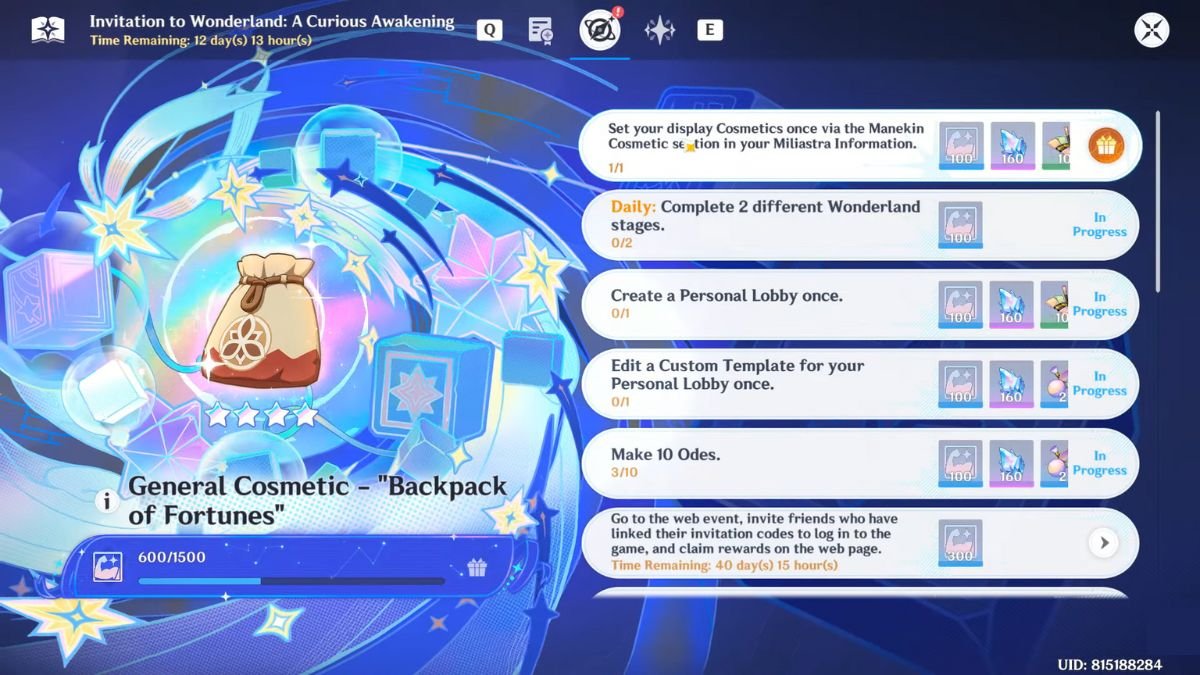
The 6th task for the Invitation to Wonderland event has the objective to set your chosen display cosmetics via the new Manekin Cosmetic feature. Just follow the steps below to know how to do so.
- Click on the Paimon icon on the top left corner, then select the pencil icon next to your profile picture.
- Select the Edit Miliastra Information option, then click on the three dots next to the profile picture.
- Select the option to Set Manekin Display, where you get to pick either one or both Manekins to use in your display.
- After picking an option, click on Confirm.
- At the bottom right of the screen, pick the Wardrobe option.
- Select your Outfit Plan in the new menu and set your character wardrobe, then click on the Go To Cosmetic Screen at the bottom of the screen once you are happy with the selection.
- Close the window, then head back to the main game screen.
- Now, check the event page to see if the objective has been ticked off. If successful, you will receive the following rewards.
- Curious Vitalis x100
- Geode of Replication x160
- Lustrous Materials: Excellent x10
Also Read: All 11 Fortune Coin Locations Genshin Impact
How To Capture and Upload 1 Custom Avatar Photo in Miliastra Wonderland
You can also set your Profile Picture here for the next objective following this one: “Capture and upload 1 Custom Avatar photo in Miliastra Wonderland”.
- Select the profile picture after clicking on Paimon’s icon.
- Click on the Custom Avatar option.
- Next to the Custom Avatar, you will spot a camera icon. Select it, then select any of the two options that appear.
- Align the photo grid around the subject you want to capture.
- Press Confirm/Enter to save changes.
Completing this objective gives you the below rewards:
- Curious Vitalis x100
- Geode of Replication x160
- Lustrous Materials: Excellent x10
Once you are done setting up your custom profile picture and customizing your character’s wardrobe, you are one step closer to completing The Invitation to Wonderland event in Genshin Impact.
Set TheGameSlayer as your Preferred Source on Google to find us more easily when searching for game guides and news!
