

Close Menu

    Subscribe to Updates

    Get the latest creative news from FooBar about art, design and business.

    What's Hot
    Final Fantasy XIV Wants You to Get in the EVA
    April 25, 2026
    Windrose – How to Get the Conquistador’s Armor
    April 23, 2026
    Windrose – How to Remove a Death Marker
    April 23, 2026
    Facebook X (Twitter) Instagram
    TheGameSlayerTheGameSlayer
    Facebook X (Twitter)
    • Home
    • News
    • Guides
    • Reviews
    • Features
    • Lists
    TheGameSlayerTheGameSlayer
    Home»Guides»Button Puzzle Solution Chapter 3 Little Nightmares III
    Guides

    Button Puzzle Solution Chapter 3 Little Nightmares III

    By Kirthana KOctober 10, 2025
    Share
    Facebook Twitter Reddit WhatsApp Pinterest LinkedIn

    ​Chapter 3’s Carnivale location has you solving various puzzles in Little Nightmares III. Some puzzles are easy to understand without any help, but some require assistance. During the early sections of Carnivale, you will find a machine with several buttons. You need to figure out what to do here so you can advance through the game. If you are having a tough time trying to solve the button puzzle, we have simplified the solution for you below.

    ​How to Solve the Button Puzzle in Little Nightmares III

    Image via TheGameSlayer

    ​You need to press the correct buttons on the machine while referring to the clue printed on the sheet stuck to the wall to solve the puzzle. After taking the elevator up in Carnivale and getting the flashlight for the first time, you will have to go through a grilled gate past a doll exhibition. On the other side of the gate is where the button puzzle is located. To head inside the puzzle room, climb up the crates next to the gate.

    There is a small opening on the right side once you get to the top. Go through it and fall down to reach the puzzle room. ​Next, find the sheet of paper on the right side of the room, roll it up by jumping up and holding on to it. This will reveal the clue to the puzzle, which hints at which buttons to press on the large machine.

    Next, hit the large button at the base of the machine using Alone’s wench to start it up. When the smaller buttons light up, use Low’s arrows to press those matching the black dots on the chart. ​For reference, use the image below to see which buttons to press. If playing with an AI Low, they will press the correct buttons automatically.
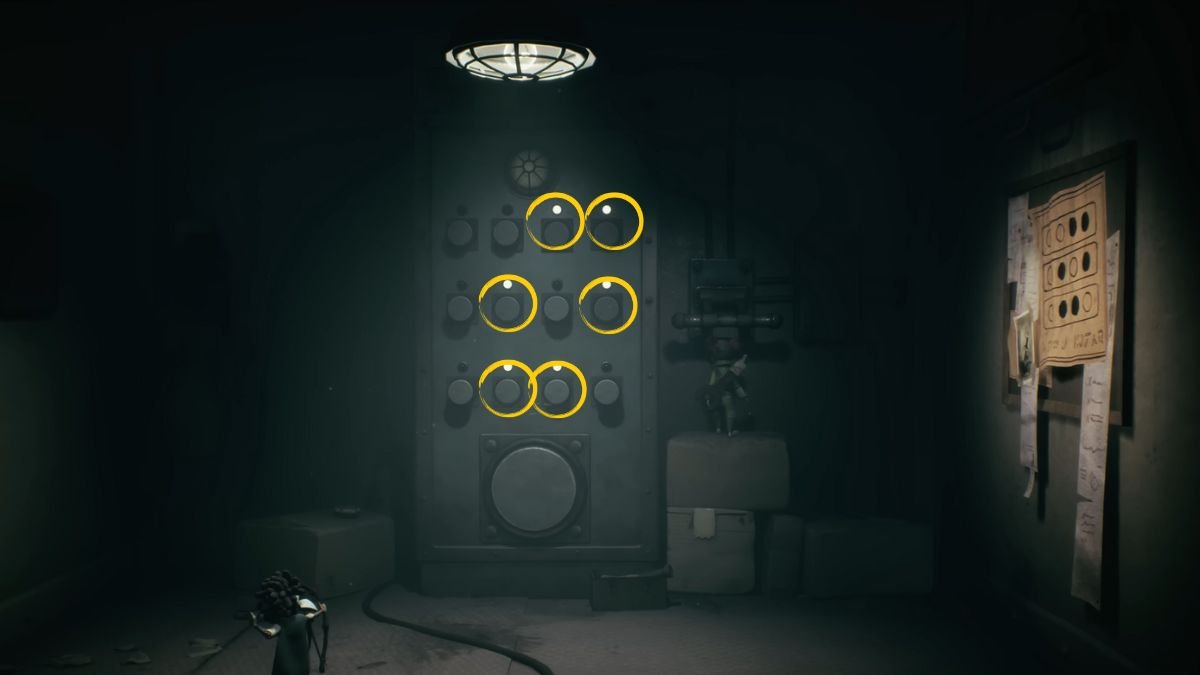
    Image via TheGameSlayer

    ​After pressing the correct buttons, pull down the lever next to the machine with your companion to complete the puzzle and unlock the gate. There is another puzzle to solve as you explore deeper in Little Nightmare III‘s Carnivale area, so check out our guide on solving the radio puzzle to know how to do that too.

    Little Nightmares III
    Kirthana K
    • LinkedIn

    Her lifelong passion of gaming led her to writing about them, bringing words to life and compiling comprehensive game guides that are quick and easy to follow. If not writing, you can catch her exploring Teyvat or the Palpagos Islands.

    Related Posts

    Windrose – How to Get the Conquistador’s Armor

    April 23, 2026

    Windrose – How to Remove a Death Marker

    April 23, 2026

    Pragmata – The Complete Training Sim Guide

    April 20, 2026
    PREFERED SOURCE ON GOOGLE

    Add as your Preferred Source on Google to find us more easily next time in your searches!

    FOLLOW US
    • Facebook
    • Twitter
    • Bluesky
    • Mastodon
    Don't Miss
    Blog
    Final Fantasy XIV Wants You to Get in the EVA
    April 25, 2026

    Get into the Final Fantasy, Shinji, or Rei will have to collab again.

    Windrose – How to Get the Conquistador’s Armor

    April 23, 2026

    Windrose – How to Remove a Death Marker

    April 23, 2026
    7.0

    REPLACED Review

    April 23, 2026
    7

    Tides of Tomorrow Review

    April 21, 2026

    Pragmata – The Complete Training Sim Guide

    April 20, 2026

    PRAGMATA – Large Bot Boss Fight Guide

    April 19, 2026
    • Home
    • Privacy Policy
    • About Us
    • Contact Us
    • Reviews Policy
    • OPENCRITIC
    © 2026 TheGameSlayer

    Type above and press Enter to search. Press Esc to cancel.

    We use cookies to ensure that we give you the best experience on our website. If you continue to use this site we will assume that you are happy with it.