


Since ARC Raiders is an extraction shooter, you’ll extract loads of items and resources on your expeditions through the Rust Belt, and overflow your inventory stash pretty quickly at Speranza Base. These items can either be recycled or sold. You need to figure out which items to recycle, and which ones you should sell to earn Credits. This guide will help you understand which items you should recycle, and how the recycling process works in ARC Raiders.
Which Items to Recycle in ARC Raiders?

Items that can be recycled have a “Recyclable” tag that appears when you hover over them in ARC Raiders. Even though nearly every item can either be recycled or sold in the game, it’s advised to recycle only those that have a “Recyclable” tag on them. Recycling items clears your stash, offers broken down items, and can also convert unwanted items into valuable crafting components. However, it’s very important to know which items you should recycle, and which ones you should sell.
Not every item needs to be sold, and the ones you can sell will have the “Trinket” tag, along with a diamond icon on their image. Tread carefully when you’re clearing out your inventory at Speranza Base, because you don’t want to sell every item. Some of them you want to recycle. To avoid getting rid of valuable recyclable crafting components accidentally, always look for the tags associated with them, and read the item description to find out which items is recyclable, and what crafting component can it be recycled to.
Selling items will offer you Credits that you can exchange with traders at Speranza Base, while recycling will help you craft more items. Take the example of a Metal Brackets. They can be recycled into metal part, which you’ll know from the “Recyclable” tag, and from reading the item’s description. So, always sort your items in your stash at Speranza Base carefully to avoid removing important and valuable items that could have been recycled into better crafting components.
How to Recycle or Sell Items in ARC Raiders
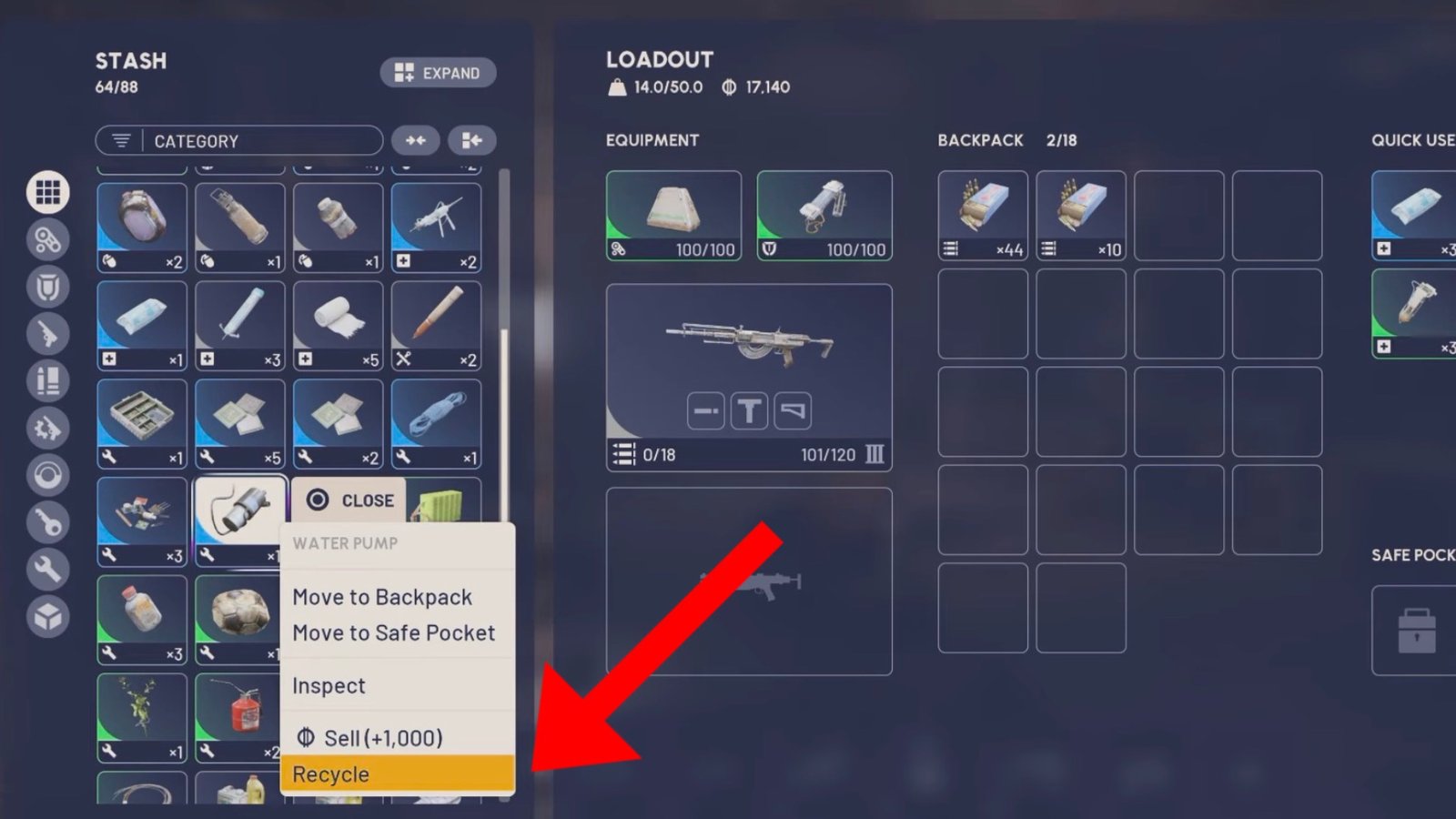
You can recycle items in your inventory via the “Context” menu from the main menu or in-game in ARC Raiders. You can even do this on the loadout screen before starting a match and leaving Speranza Base. This works for selling items as well. For your convenience, here’s a step-by-step guide on how to recycle items in ARC Raiders.
- Head to your inventory by pressing Tab (PC), Touchpad (PlayStation), or the “Select/Back” button (Xbox). You can access your inventory tab from either in-game or the main menu.
- Select an item from the inventory or your stash.
- Check which items have the “Recyclable” tag at the top, and read the item description for more information.
- Click on the items to open the “Context” menu.
- Here, select the “Recycle” option to recycle all selected items.
To sell your items, follow the same procedure, and click the the “Sell” option on the selected items in the “Context” menu to sell your items for some hard-earned Credits. That’s all you need to know about recycling items, and how it works in ARC Raiders. For more comprehensive guides on the game, check out the ones on Supply Call Stations Guide and A Bad Feeling Quest Guide.
