

Close Menu

    Subscribe to Updates

    Get the latest creative news from FooBar about art, design and business.

    What's Hot
    Palworld Boss Sets the Record Straight About AI in Games
    June 19, 2026
    Gothic 1 Remake – Best Weapons For Every Build
    June 19, 2026
    Gothic 1 Remake – Best Way To Safely Reach The New Camp and Swamp Camp
    June 19, 2026
    Facebook X (Twitter) Instagram
    TheGameSlayerTheGameSlayer
    Facebook X (Twitter)
    • Home
    • News
    • Guides
    • Reviews
    • Features
    • Lists
    TheGameSlayerTheGameSlayer
    Home»Guides»How To Run A Cable In RoadCraft
    Cable Runner Vehicle RoadCraft
    Guides

    How To Run A Cable In RoadCraft

    By Santosh KumarMay 20, 2025
    Share
    Facebook Twitter Reddit WhatsApp Pinterest LinkedIn

    Bringing power or energy to any isolated building is a difficult task; you must have the proper equipment with machinery to pull off the task at hand. In Roadcraft, you must run a cable to buildings to restore or bring power back to the location. Here, you must choose the proper vehicle to start laying cable from the zone with power to the zone without it. Here’s a complete guide on how to run a cable in RoadCraft.

    Running A Cable In RoadCraft

    Cable Placement Vehicle RoadCraft

    Basically, we have to lay a cable from the blue area to the red area. The area in the blue color is identified as a power-enabled zone, which will be the Transformer Station. If you check the area around the Transformer Station, it will have a blue area of effect with static symbols. The area with the red color has no running power, it could have any facilities on the map. Cable will help us connect both zones and restore power to the area in the red zone.

    Select Vehicle to Run a Cable

    Vehicle Option RoadCraft

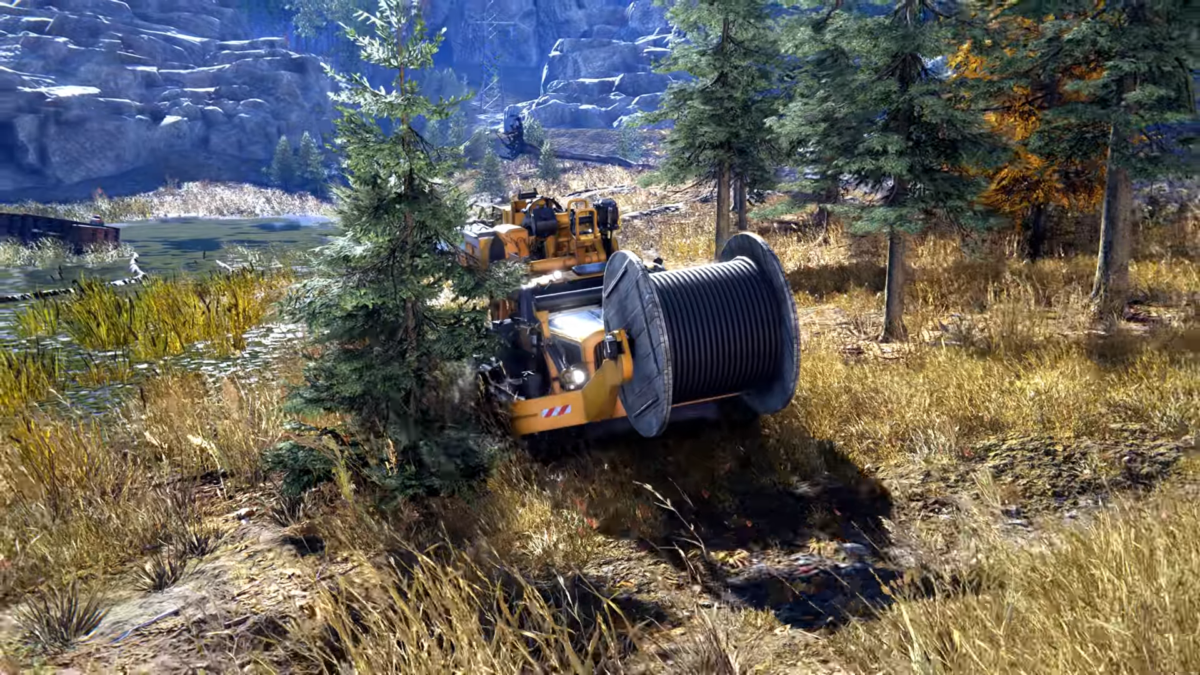
    To run a cable between two zones, we will need a vehicle capable of laying the cable on the ground. Here, head over to the Vehicles section, choose Vostok TK-53 “Krot” Cable Layer. This vehicle will allow us to place the cable on the ground connecting from one to another. The wooden cable drum attached to the front of the vehicle will remain inactive until you move the vehicle.

    • Get inside the vehicle and start moving it to the Blue zone around the Transformer Station. You can open up the map to ensure you are indeed in the proper location.
    • Once you are in the sweet spot, activate the Cable, and you will see the vehicle’s rear-end machine being slowly placed on the ground. This will drag the wire out of the wooden cable drum in the front to the vehicle’s rear end. As you move the vehicle forward, the cable wire will start rolling with it.
    • When you start to move the vehicle, it will start digging the trench with the blades on the backside, and the cable will get placed on the ground. Here, you will also notice the blue area around the cable, this indicates the energy of the Transformer Station being carried via the cable.

    The biggest problems you will face when you are moving the Cable Layer vehicle are tree trunks and rocks. Here, you must make sure to navigate the vehicle properly so you will not get stuck on a tree stump or a bunch of rocks on the ground. If you spot any blockades in front of your vehicle, look for any free space to squeeze through.

    Check our guides on the game, these will help you use AI effectively in RoadCraft, and build bridges in the game.

    RoadCraft
    Santosh Kumar
    • LinkedIn

    Santosh Panda creates gaming guides at The Game Slayer. With 5 years of writing experience under his belt, his journey to game writing has helped many fight the big monsters, solve intricate puzzles, disarm the hidden traps, and finally open the treasure box.

    Related Posts

    Gothic 1 Remake – Best Weapons For Every Build

    June 19, 2026

    Gothic 1 Remake – Best Way To Safely Reach The New Camp and Swamp Camp

    June 19, 2026

    Dave the Diver – How to start In the Jungle DLC

    June 19, 2026
    PREFERED SOURCE ON GOOGLE

    Add as your Preferred Source on Google to find us more easily next time in your searches!

    FOLLOW US
    • Facebook
    • Twitter
    • Bluesky
    • Mastodon
    Don't Miss
    News
    Palworld Boss Sets the Record Straight About AI in Games
    June 19, 2026

    Does one need to use AI for a video game? Palworld’s publishing boss says ‘no,’ and explains why.

    Gothic 1 Remake – Best Weapons For Every Build

    June 19, 2026

    Gothic 1 Remake – Best Way To Safely Reach The New Camp and Swamp Camp

    June 19, 2026

    Dave the Diver – How to start In the Jungle DLC

    June 19, 2026

    Infinity Nikki Fans Are Locked in Bizarre Cleavage Wars

    June 18, 2026

    Gothic 1 Remake – Who is Shrat?

    June 18, 2026

    Gothic 1 Remake – Where To Find Saturas

    June 18, 2026
    • Home
    • Privacy Policy
    • About Us
    • Contact Us
    • Reviews Policy
    • OPENCRITIC
    © 2026 TheGameSlayer

    Type above and press Enter to search. Press Esc to cancel.

    We use cookies to ensure that we give you the best experience on our website. If you continue to use this site we will assume that you are happy with it.